Sunday, July 23, 2017

Pillow block / stepper housing designed with Cadquery

     Just to share one cool pillow block / stepper housing design. This was designed to take a pair of 6801 bearings and a NEMA 17 stepper, hence the parameters in the script. In my application it will receive a shaft loaded in cantilever. 

The assembly for my application (without bearings), to hold the bearings in place, we have in one side a flange (purple),  on the other a flanged nut (not shown) screwed to the shaft. In red is the shaft designed for my application, with a groove to receive a belt. In black is a representation of a stepper motor. 


Here is the pillow block / stepper housing alone. The feature on the top is an access slot for easy access to the curved jaw coupling. Inside the cylinder theres a ring, meant to be an spacer for the bearing pair. 

    The cadquery code for this part:

Some pictures of the part after the machining:


All the parts ready for the assembly

The shaft with the groove for the belt


A custom hand ground HSS tool bit made to cut the groove in the shaft. Worked like a charm. 

Once again, 

Cheers,
Edi

Thursday, July 20, 2017

Line boring on the Schaublin 102

     Today I'd like to share some pictures and insights about a technique called line boring. The part we're going to make along this post looks simple, and in fact, it is! But some care is made necessary in a few aspects. To cite the two I find to be the most important: Bore accuracy and bore misalignment. The first is important because if end up with a hole too small, the shaft will be locked, and that's if you're able to put it in place. If the hole is too big, the shaft will be lose around the hole, and you probably can't call anymore your bored surface as a journal bearing. The second important factor, the bore alignment is the topic we're going to talk about here. As you can imagine, if you have a casing, and the holes in walls which the shaft is going to seat are not aligned, ....problems again. 
      
 The part I need to get done, 40x40x40mm U profile with 4mm wall thickness. The holes should be in the center of  the part and are specified to 12mm diameter h7 tolerance. The holes will act as a journal bearing to a shaft passing trough.

     By the way, this part is good example of a designer's dilemma. You can choose between a part simple to manufacture but using off the shelf products, or go with simple design but high precision demanding. On the First case you need to look for the products in catalogs, make the order, pay, wait for the post to deliver the parts.  The second you need the craftsmanship needed for precision work, patience to set up the parts. Overall: both are time consuming, but in different ways. (If you read until the end you'll know which path I took.)
      Back to the topic: The easiest way to achieve a good precision in this case is to ream the hole, with a reamer long enough to go through one side and reach the other side in the same setup. This is the spirit of the Line bore. In addition to that, if all goes well, the reamer should leave a h7 hole in place, solving at the same time the hole accuracy problem. 
       Luckily, by the geometry of the part, and knowing that we have at hand the necessary tools, we can proceed with the line bore idea. Enough talk, let's do some work.

Started cutting the aluminum U profile with a hacksaw. Most surfaces will stay untouched as they are already to spec. So the only care here is about the length.

Wow, when you are just rolling the mouse wheel to down the web page it seems so easy. Here due to the magic of photo time shift, we already have the part cutted, perfectly squared and deburred. Effortless .. uhhm ehrr not really.  

 Marking the part. Not really needed, but that helps in keeping Mr. Bozo away.

Using my favorite Dial Indicator to make the surface perpendicular and parallel to the ways of the lathe. Surprisingly this is an imperial one. The angularity error here was one thou (of an inch) over 40mm. I need to write more about this indicators someday.

The tools separated for the job. Is always a good idea to open the hole progressively, so here you see the drill bits  (2x6 spot,  6 , 8 ,10, 11.8 and 12h7 reamer) and their respective collects. In the end I think I could used 8 and then 11.8 direcly, but I didn't want to take the risk as my setup was not so rigid.

Spot drilling. Here you can see my setup as well. The workholding is not ideal, but did the job. Looking at the picture now, maybe I'd try different things, but in the workshop the clock is ticking, and you or you spend your time improving things, or you make your move and get the job done.

Bigger drill bit

The 12h7 reamer in action

The reamer trough both bores. 

Top view

Here is the final part

     Ok, not super precision stuff, yet there's some precision involved. Definitely was much much faster than buying something on-line and wait for the arrival. Took me less than 1 hour, and it was fun to make.

Edi

Saturday, July 8, 2017

Quick tip to align a part with a thin tab in a lathe


     The problem: Align the holes in a part with plastic flat plate that should go underneath. The workshop I have access is very modest. No fancy CNCs, no DROs, the machines are small. Luckily the plastic plate fitted in the drill press, otherwise I would need to use the hand-held drill to poke the holes.  
     My plan:  Use a joint alignment pin (commonly used in woodworking), to indent the holes position in the plastic board, drill the holes with the drill press, hammer the pins in, go to town and have some beers. 
     The flaw in my plan: The holes in the part has a unusual dimension (5.35mm) and the shank in the commercially available  joint alignment pin has always full numbers dimensions (4, 6, 8 mm). 
     My workaround: machine the shank in the lathe to my number.
    The problem with the workaround: I would need to hold the part by a very thin tab. 

I don't now exactly how to call this, but I found in the internet as joint alignment pins

      I found out that the collet holds this well enough to machine it. The problem is that even in the collect this is not easy to align. If super precision was required I could use the dial indicator, but the part doesn't needed to be super precise.  So, here comes my quick and dirt solution to this case. I used the tailstock chuck to hold the shank, pulled the tailstock close to the headstock, and this way inserted the part in the collet. 

Using the tailstock to insert the part aligned in the collet

Voilà, we're ready to make some chips

     Well that's a trick useful only for very specific operations, but anyway, something to keep in mind.

Monday, June 5, 2017

An anti-kink device for a novel high tech cable

     Well, its been a long since the last post. I apologize about that. I had a little life twist and ended up married in Switzerland. I've spent the lasts months adapting myself to the new life. So far, a great time. I'm currently working at nanoleq,  a Zürich based startup trying to make a novel high tech cable. Up to now we are a 3 man company, but the energy around is great, such a cool team. 
     Going to the point of the post, It's about a anti-kink device for our novel cable. The idea was to make an cable prototype, that would be something to show other people our tech, something that you could hold in your hands, put to use, etc. In my opinion much cooler than just talking about our idea in the business meeting with the companies we visit to try to raise interest in the our technology.
      My approach was to make a 3d print mold of an anti-kink device and then fill it with silicone, so we should end with a cool transparent part. Been a big fan of open-source software, I used Freecad+Cadquery to achieve my goals. Cadquery is a great software. It's very convenient when you don't know exactly the parameters of your design, so you can do a second iteration very quickly. The next image shows my design. 


The cadquery code to obtain this model is the following.


     I know that there's a lot of room for code improvement to make the design really parametric. In the middle of the development of this prototype the other folks at nanoleq decided to put this project aside, as other priorities appeared. So I stopped working on this, but at this point I already had some results, the ones I'm showing in this post. Still, to have a refined results, other iteration would be necessary. After making the first cable I saw that I should made the riser channel bigger, so you have a silicone reservoir in case of leaking or shrinkage. Other thing I would make different is this sphere cavities. This was my idea to have some indexing between the two sides of the mold, but only two spheres is not enough, you still have some play when you try to put the mold together. Not a big deal, as you sense the misalignment with your finger and correct it. Anyway, if I would do it again  I would try to put another sphere on the upper side of the mold to see if I get better results. 


     Here is the 3d printed part with the ball bearing balls epoxy glued in place.


     The three cables twisted (ground, left and right) and with the headphone jack soldered.


     Here is the final result. A little rough, but I'm sure that with more time to finish the mold, a smooth finish could be achieved.


Well, thats it! Thanks for reading.

Edi

Tuesday, December 20, 2016

Stress along a cut line in Calculix

     This videos is about how to plot a entity value against a cut line (node sequence) generating plots like this:


Friday, November 4, 2016

Energy comparison plot revisited

     Looking back in my post about energy comparison graph,


is easy to see room for improvement. So in this one I'm sharing a code to make the same plot, but in much more pythonic way. Take a look in the code:


     In the first time I refused using "def" to define the function, thinking this would be overkill for a simple script, and would affect the readability. I was wrong, now the code bloat is reduced, and the readability is even better. The way python works, permitting that you define the parameter value inside an array (look at lines 31, 32, 33), keeps the readability, and also makes the order of the parameters in the array unimportant. Sweeeeeet.

Saturday, October 29, 2016

Hexahedral Mesh Refinement in Salome

     In this video I show some ways to refine the hexahedral mesh of the beam we did before. This procedure is meant to be more clever than simple making the "number of segments" parameter bigger and bigger.


Thanks again!

Cantilever beam finite element analysis using open source software

     In this video I'm modeling, meshing and computing a cantilever beam using open source software. For the model and mesh, I've used Salome7, and the finite element computations were carried out with Calculix. This is meant to be an practical introductory video to free fea software. Theres an insane amount of theoretical books about this subject out there, take a look on them before designing your own cranes (LoL). 


The code for the calculix input deck:

Cheers!

Friday, October 28, 2016

Plotting Beam Diagrams with Python

     Today I'm sharing how to plot Beam Diagrams using python. More specifically the code is about a cantilever beam subjected to gravity load, a special case of uniformly distributed load. There's a bunch of cool python features in this post, like the very convenient use of "x>" to evaluate a function, or part of it, only after a specified value in the array.

For example, the code: (my blog font shows this symbol =, as equals, this is a minus -)

import numpy as np
x=np.linspace(1,10,10)
y=2*x*(x>5)
print x
print y

returns these two arrays.

[  1.   2.   3.   4.   5.   6.   7.     8.   9.    10.]
[  0.   0.   0.   0.   0.  12.  14.  16.  18.    20.]

     Values with "false" boolean condition returned 0, and the values with "true" condition were evaluated. This is very useful when computing singularities functions, also known as Macaulay method, due to the British mathematician William Herrick Macaulay.  Oddly this method was first proposed by the German mathematician Alfred Clebsch. 

    Other features that worth take a look is how to make very neat plots using matplotlib subplots method.

The code:


The plot:


See ya!

Monday, September 19, 2016

Running old C 'Marv Klotz' programs in Linux

      In a video about springs in youtube channel "this old tony" he recommends (at 4:35) a program that calculates mandrel sizes to make springs. The suggested program is written by Marv Klotz, and can be found in 


      Looking at Marv Klotz website I found a lot of interesting programs that can help in the shop. The drawback is that the programs runs in 32bit DOS. 
      Now, Is this a big problem ? Well, not a all. To run the programs in Ubuntu linux is pretty easy. 

First open the terminal ( Crtl + Alt + T ), then type: 

sudo apt-get install dosbox

      Put your password, and you'll install a DOS emulator in your computer. Now lets suppose you want to run the "bend" program, and you've downloaded and extracted it into the "download" folder.  With DOSbox  application open, type:

mount c /home/user/downloads

and then, 

c: 

        Know you have a virtual c: drive in downloads folder, in wich you can run the program typing the *.exe name, in the case of the example, BEND. 
        A final note: user is your computer name. As you can see in the print screen, using my computer as example, I've typed "mount c /home/eddie/downloads" 


Finally, a print screen of the BEND program running: 


Tuesday, September 13, 2016

Testing Fusion 360 - A Wine Rack

     At the moment I'm moving to switzerland and It's been a long time (3 months) without my desktop computer. The laptop computer I'm using runs windows, so, as always, I'm trying design softwares that fit the operational system and my tastes.
     This time I did some testing in autodesk fusion 360. I found it to be friendly, from the interface, to being free for low budget engineers. I like the team project features and the work versioning. The drawbacks is that I found it to be slow. At least in my computer the screen is always freezing for some time, which is annoying. 
     Veridict: It's cool, mainly if you're going to do some teamwork.


The simple project I did to test the software: A wood wine rack.


Of course I needed to bring this to real life. Not that hard, but not that easy with just a $10 saw, and a rock as a hammer. 

     Final word: I still prefer some opensource CAD programs out there. 
     I still need to test drive Onshape, though. I really think this cloud plataform is promissing, because we can use it in windows or linux both, and besides, it has teamwork features as well.  

Friday, July 15, 2016

Car, motorcycle and bicycle energy comparison graph using Matplotlib

     Everytime I met bike enthusiasts there's a lot of fuss about the bicycle being more efficient than cars and motorcycles. So I thought in making a graph comparing cars, motorcycles and bicycles . Of course here Is shown a mechanical stand point about the subject.

     The simplest energy equilibrium equation goes like this:


     F_t is the traction force 
     F_r is the resistance force
     F_i is the inertial force
     F_a is the aerodynamic drag force
     F_r is the rolling resistance force
     F_g is the gravitational force
     V is speed

     The power that makes the vehicle goes forward equals the speed times the its traction power. That power has to overcame the resistance forces in the opposite direction of the traction. 
     The resistance forces can be model as, inertial forces, aerodynamic drag forces, rolling resistance forces, and gravity resistance forces.  Roughly the inertial force deals with speed variations, the aerodynamic drag is the drag imposed by the air, the rolling resistance is deals with the mechanical friction between parts and the gravitational forces is the tangential forces caused by gravity, helping you in downhill, and making your life harder in hillclimbs. Mathematically they can be written as bellow. 


      C_d is a dimensionless parameter called drag coefficient.


     C_r is a dimensionless paramenter called coefficient of rolling resistance.


      I is the steepness of the hill (rise/run)

      To plot the graph I'm using an amazing python library called matplotlib. See the script.

    
     And here is the graph plotted:


     One final word, a very cool site doing an interactive version of this calculations only for bike) can by found in Mr. Steve Gribble website.


Once again, thanks for reading. 

Eddie. 

Friday, July 8, 2016

Pressure vessel FEA using Calculix and Salome 7 - Part 3 (Simulation)

In the last part of the Calculix + Salome 7 FEA, I've shown how to run a Calculix ccx Input deck.

The video:


The code:

Thanks !

Eddie

Friday, June 24, 2016

Pressure vessel Finite Element Analysis using Calculix and Salome 7 - Part 2 (Mesh)

     In the part 2 (of 3), I've shown how I made the mesh for the finite element analysis of the can using Salome 7 software. One of the problems we face using Salome+Calculix is that Salome7 don't export the mesh in *.inp format needed for calculix. Our solution to the problem is to export the mesh in *.unv and convert it using a python script. 


     More information on these extension conversion scripts can be found in the following sites:


     Or you can download the one that I already fixed here (.tar.gz) or here (.zip).

Friday, June 17, 2016

Pressure vessel Finite Element Analysis using Calculix and Salome 7 - Part 1 (Geometry)

     One of the reasons I made this blog is to keep a record about what I'm doing so in the future I can come back and see details, that with time I can end up forgetting. This Video is about Finite Element Analysis using only free software, some of them open-source. The softwares I'm talking about are Calculix and Salome 7.

    The test model I'm simulating is internal pressure of an aluminum can, and its effects. An aluminum can is a good  because its commonly available, cheap. So it's relatively easy to get some results experimentally to match with the calculations. Other good reason is that the analytical models of pressure vessel are very straightforward, good for solid mechanics students. 

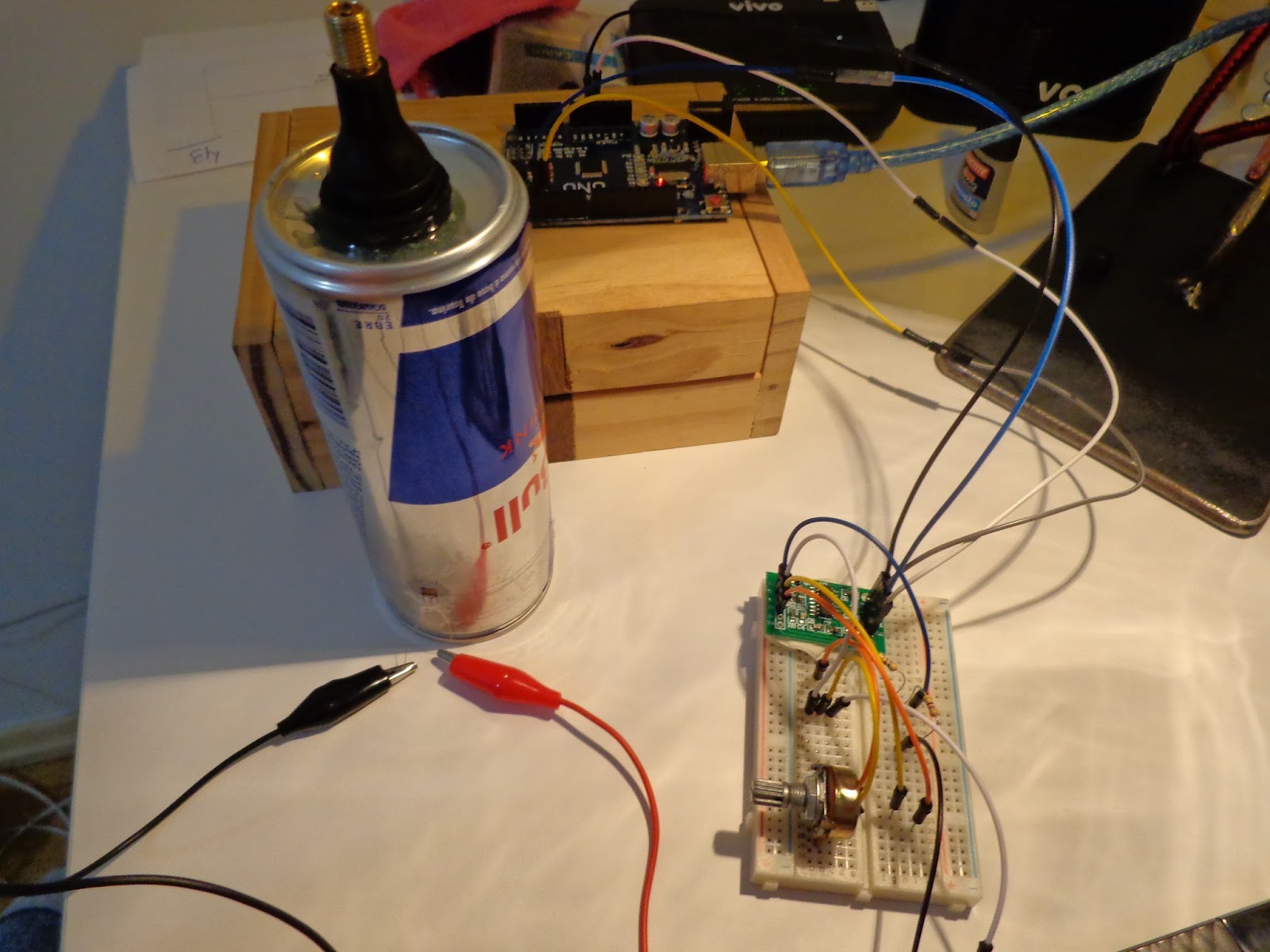
     In the picture we can see that the can I'm using is a funky one, because I attached a tire valve stem, so I can load and unload the can with air pressure, and use a tire pressure gauge to read a ball park value of the inside pressure in the can. 


     I also have a strain gage bonded in the can, making possible some extensometry studies, and perhaps numerical values of the strain related to the internal pressure


      Here we can see an arduino setup to read the Wheatstone bridge.  

     
     The last picture is the results for displacements that returned from calculix. The numerical answer has shown a good agreement with analytical calculations.  


    Finally, the video: 


Sunday, June 12, 2016

Compressibility Factor For Air on HP50g

     The compression factor is related to the difference between the behavior of real and ideal gases. The ideal gas model tends to fail at low temperatures or high pressures, requiring correction. In the image below is shown an example of this misbehavior, in the case for nitrogen.

 Source: http://www.chem.ufl.edu/~itl/4411/lectures/lec_e.html

The compressibility factor is expressed by the relationship:


     There are several methods for finding the compressibility factor under certain conditions of pressure and temperature. The classic method is to search for the information on diagrams available in the relevant literature, but here is shown another method that is based on a modification of the Redlich-Kwong equation of state. It is an iterative method.

      The algorithm shown is proposed by Tapan Kumar Sen and published by Breno Tresoldi Minzon and Fabio Malavazzi Santilio. The original program, that operates in Reverse Polish Notation (RPN), is available in http://www.hpcalc.org/details.php?id=5806.

     The proposed approach is iterative, making an interesting use of programmable computers. The method is to guess an initial value for "Z" and iteratively achieve convergence between the following formulas:
 
  
Pr is the reduced pressure, given by Pr equals  P / Pc.
Tr is the reduced temperature, given by Tr equals T / Tc.

      The constant Pc and Tc are the critical pressure and the critical temperature of the gas. The values for some gases are shown in the table below.


     As my interest lies in the properties of air (applied to compressors, internal combustion engines) the code shown is built to deal directly with this gas.
    The following example is in USER RPL, to use with HP50g calculator in Algebraic mode.

The program also can be downloaded here.

Thanks for reading.

Eddie

Saturday, June 11, 2016

Live data plot with Arduino + Python

      This post is about my interpretation about live data plot using  Arduino and python. I say it is my interpretation because it already been post by a few people some scripts about that. I like very much the one posted by Mr. Paul McWhorter, its simple and very well explained.

http://www.toptechboy.com/tutorial/python-with-arduino-lesson-11-plotting-and-graphing-live-data-from-arduino-with-matplotlib/

     But the problem begins when you need high baudrates. Mr. McWhorter application is reading a temperature sensor relatively slowly. My application was a Gyroscope + Accelerometer MEMS sensor (MPU6050 by Invensense), and I needed faster rates. I don't know why, at least with my setup, Python 2.7, Ubuntu, Arduino Uno Clone and MPU6050, when the communication between computer and the microcontroller begins, Arduino sends some gibberish just in the very beggining, but it is enough to ruin the communication. My way around this problems goes in the script below.


     Here is the print screen of the script running, it's very cool to see real time data being plot.


     One final information: in the arduino side I used a Script by Jeff Rowberg, which can be found in https://github.com/jrowberg/i2cdevlib. 

Thanks for reading

Eddie

Friday, June 10, 2016

Machining Plexiglass

Having some fun machining plexiglass for another machine protection guard. Truth be told, nothing is funnier than making some chips!


Thanks for stopping by!

Eddie

Wednesday, June 8, 2016

A simple Scriber in CadQuery

     Considering I've worked with a number of 3d drawing softwares (SolidWorks, Catia, Inventor, AutoCAD 3d) I Need to say: CadQuery is awesome. So far I liked it better than the formers.

     Rhinoceros still my favorite one, but it has an Achiles heel, It doesn't work in linux. At the time of this writing, I'm running only ubuntu in my personal computer. For my taste ubuntu is a lot better than windows, and pay for it just to run only one software sounds bad for me.

     When I was searching for 3d softwares for ubuntu, at some point I found CadQuery, and better yet, it has module to run along with Freecad.

     CadQuery is coded by Dave Cowden, and the module is provide by Jeremy Wright.


     I really need to say that these guys done an awesome work. Thanks.

     The installation is very easy and the learning curve, steep. In the same day I wrote my first script, a Scriber based in the design by Stan Bray, published in Workshop Practice Series Number 14 - Making Small Workshop Tools.

Source: BRAY, Stan. Workshop Practice Series Number 14 - Making Small Workshop Tools. Argus Books, 1987. P.8.

The Code:

The Output:


Thanks for reading!

Eddie

Tuesday, March 15, 2016

Thermophysical Properties of Ammonia-Water mixture (NH3-H2O) - Absorption refrigeration - HP50g

      After some trouble reading NH3-H2O equilibrium diagram, I decided to implement a code to run an algorithm to give me the values without having to search in the fuss of lines of the graphical diagram (see image below). The plataform I used was the HP50g calculator.  

 NH3-H2O equilibrium diagram
source: ASHRAE

     One good thing in doing that is the elimination of the gross errors while reading the diagram. 

       The functions used to code is referenced in:

PÁTEK. J.; KLOMFAR, J. Simple functions for fast calculations of selected thermodynamics properties of the ammonia-water system. International Journal of Refrigeration, 18(4), pp. 228-234, 1995.  

T=temperature; P=pressure; x=molar fraction of ammonia (NH3) for the mixture in the liquid phase ; y=molar fraction of ammonia (NH3) for the mixture in vapour phase

Equation for temperature in function of pressure and molar fraction of ammonia (NH3) for the mixture in the liquid phase


Equation for specific entalphy in function of pressure and molar fraction of ammonia (NH3) for the mixture in the liquid phase


Equation for temperature in function of pressure and molar fraction of ammonia (NH3) for the mixture in the vapour phase

Equation for specific entalphy in function of pressure and molar fraction of ammonia (NH3) for the mixture in the vapour phase


      Altough the equations are fully empirical, they have shown excellent results for pressures up to 30 bar. 

      Setting the equations in the calculator is undertaking, but for HP50g users I will provide a link with the files. 

The files can be found here.

How to use?

Very simple, First you download the files and move them to the calculator. There are two ways to do that, one is via the connectivity kit, or easier yet, using a SD card.

In the calculator you call the numeric solver function (press orange button then 7), browse to the files and you're in the business.

Thanks for reading. 

Eddie